
AI-powered customs declarations for any destination country
Open a shipment for each consignment and upload its invoice into it (or upload an invoice from Documents). Customs Declare classifies HS codes, checks rules of origin and CITES restrictions across 29 trade agreements, builds the customs value and duty, compares your supporting documents with the invoice, and prepares a country-specific declaration for your review -- you approve every detail before you submit it, in the destination's own language.
How it works
From upload to a ready-to-submit declaration -- but nothing is ever submitted automatically. You always review and approve the HS codes, duty figures, and every other detail first.
- 1
Start a shipment
Create a shipment for the consignment and upload the commercial invoice into it, with the packing list, transport document and certificate of origin alongside. Or upload an invoice on its own from Documents, the API or a mailbox, and a shipment is built from it once it is read.
- 2
Classify
Each line item is read and matched against the full HS2022 nomenclature to propose an HS code.
- 3
Validate
Checked against rules of origin, CITES-protected species, country-specific import and export licensing and prohibitions, MFN vs. preferential duty rates across 29 trade agreements, and additional charges like community-bloc and vehicle import levies where they apply -- AfCFTA, USMCA, RCEP, the EU, and more.
- 4
Review & approve
You approveEvery declaration comes back to you first -- HS codes, duty figures, every flagged detail. Nothing leaves your workspace until you've reviewed it and explicitly approved it, no matter how confident the automated classification is.
- 5
Declare
Customs Declare produces the completed declaration document for the destination's own form and authority, in that country's required language -- 75 languages supported. You submit it to the customs authority yourself, or hand it to your broker.
Two ways to upload an invoice
Same invoice, same review, same approval, and the invoice is billed the same way. The difference is whether the rest of the consignment is kept with it from the start.
Upload into a shipment
- Create the shipment (reference, transport mode, route), open it and upload the commercial invoice there.
- The packing list, bill of lading or air waybill and certificate of origin go into the same shipment: free, up to 10, and compared with the invoice.
- Freight and insurance are recorded on it, so customs value, duty and VAT are worked out on the full value and Ready to file shows what is left.
Upload from Documents
- Upload one invoice on its own, or pick a shipment in the upload form. Invoices sent through the API or a connected mailbox arrive this way.
- Once it is read, a shipment is created from it when it states the invoice number, shipper, consignee, lines, total and currency and a transport mode was chosen. Otherwise it stays on its own and you link it to a shipment later.
- A packing list, transport document or certificate of origin cannot be uploaded on its own, and one emailed on its own is not ingested. Upload it inside its shipment, where it is free.
Two places, two jobs
The shipment holds one consignment and everything around it. The document is the invoice that is read, priced and approved.
The shipment: one consignment
Everything for one consignment lives together, so documents can be compared and costs and progress sit in one place.
- Create it first and upload the invoice into it, or upload an invoice from Documents and let the shipment be built from it.
- Add the packing list, bill of lading or air waybill and certificate of origin: free, up to 10.
- Record freight and insurance so the customs value, duty and VAT are worked out on the full value.
- Check the Ready to file panel, then download the declaration.
- After filing, record customs queries, assessed duty and payments, milestones and the booking.
The document: one invoice
The commercial invoice is read, classified, priced and approved. It is the only billed document and the only one that gets a declaration.
- Upload it into a shipment or from Documents: PDF, JPG or PNG, up to 50 MB.
- Check what was read and the proposed HS codes, and fix anything shown in red.
- Confirm any finding that no box can fix by writing what you checked.
- Approve it. A person always does: nothing is filed automatically.
- Need a change later? Modify reopens it and you approve again.
From invoice to finished declaration
One sample consignment, step by step: what you do on the shipment and what you do on each document. All figures are illustrative sample data, not a quote.
Step 1 of 8 · On the shipment
Create the shipment
One shipment per consignment: a reference, the transport mode and the route. Everything for it is kept together.
Shipment: one consignment, with all its documents and costsDocument: one invoice, read and approved by a person
Finished declarations, built from real data
Every declaration below was checked against live tariff, tax, rules-of-origin and import-restriction data, then rendered in the destination's language.
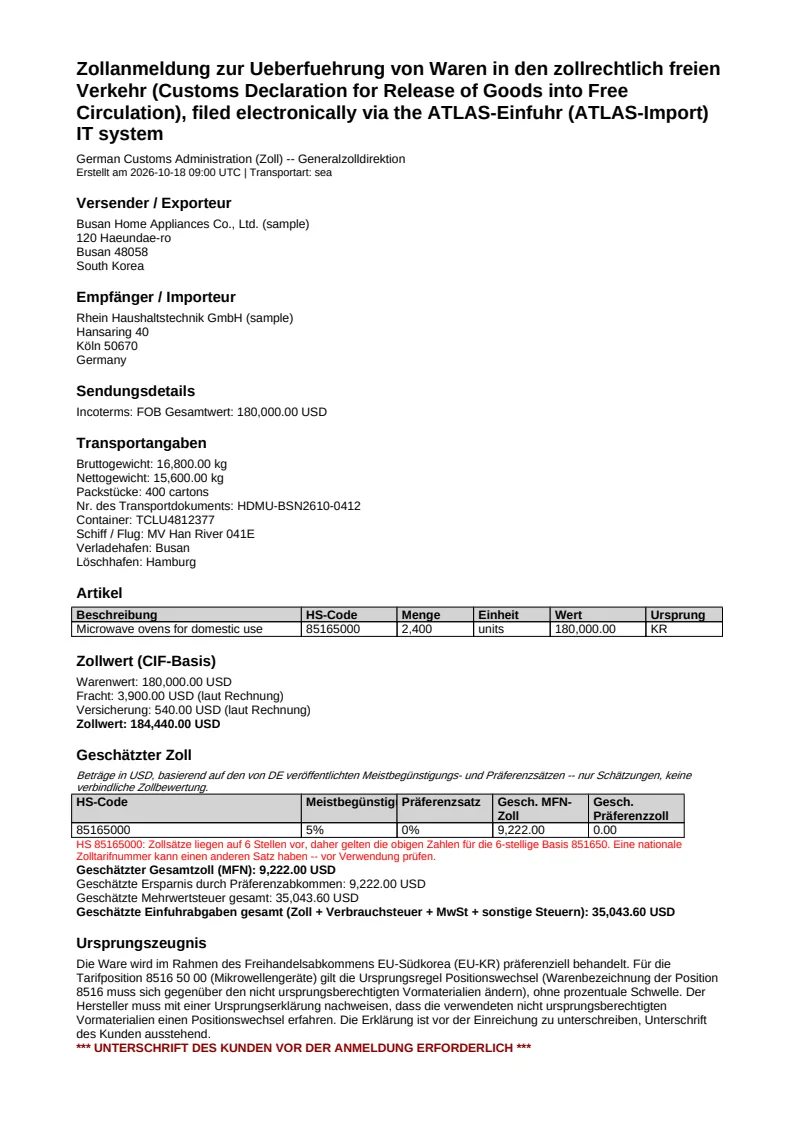
South Korea to Germany · German
Microwave ovens
5% reduced to 0% under EU-Korea FTA
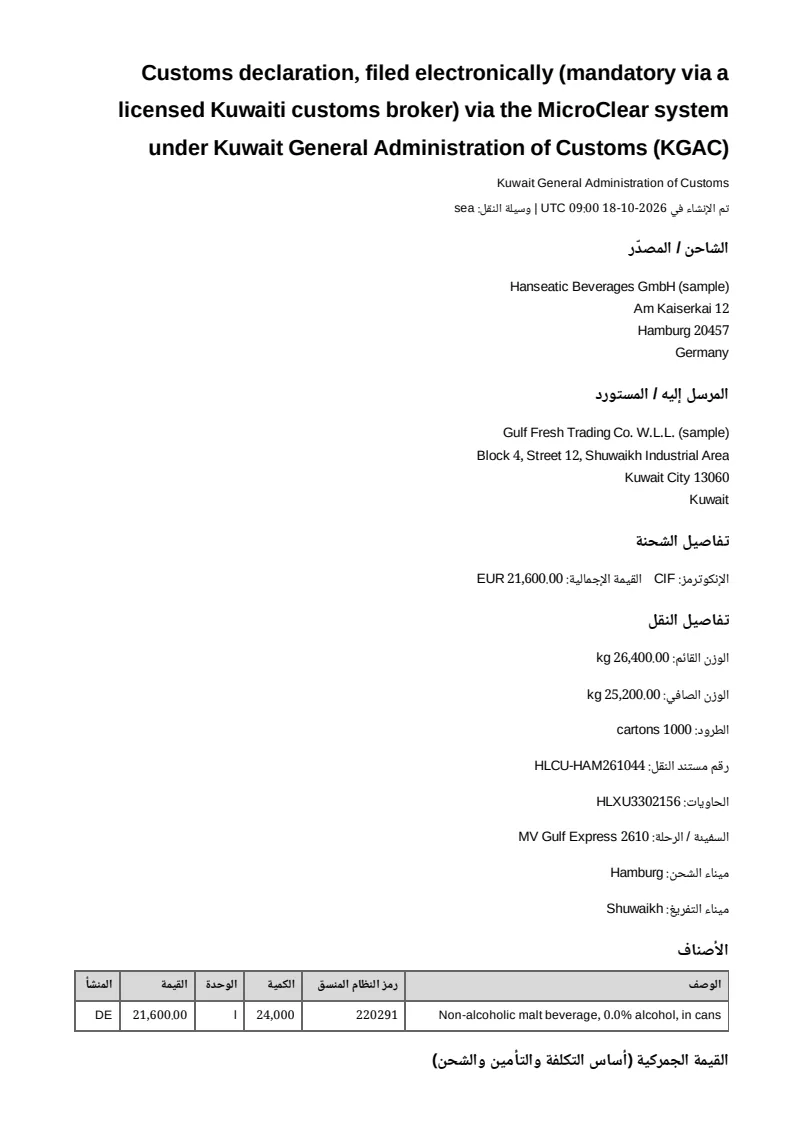
Germany to Kuwait · Arabic
Non-alcoholic malt beverage
Prohibition check: Kuwait bans alcoholic beverages and pork. A malt drink with 0.0% alcohol is within the 0.05% limit, so it is allowed; keep the label or a lab report.
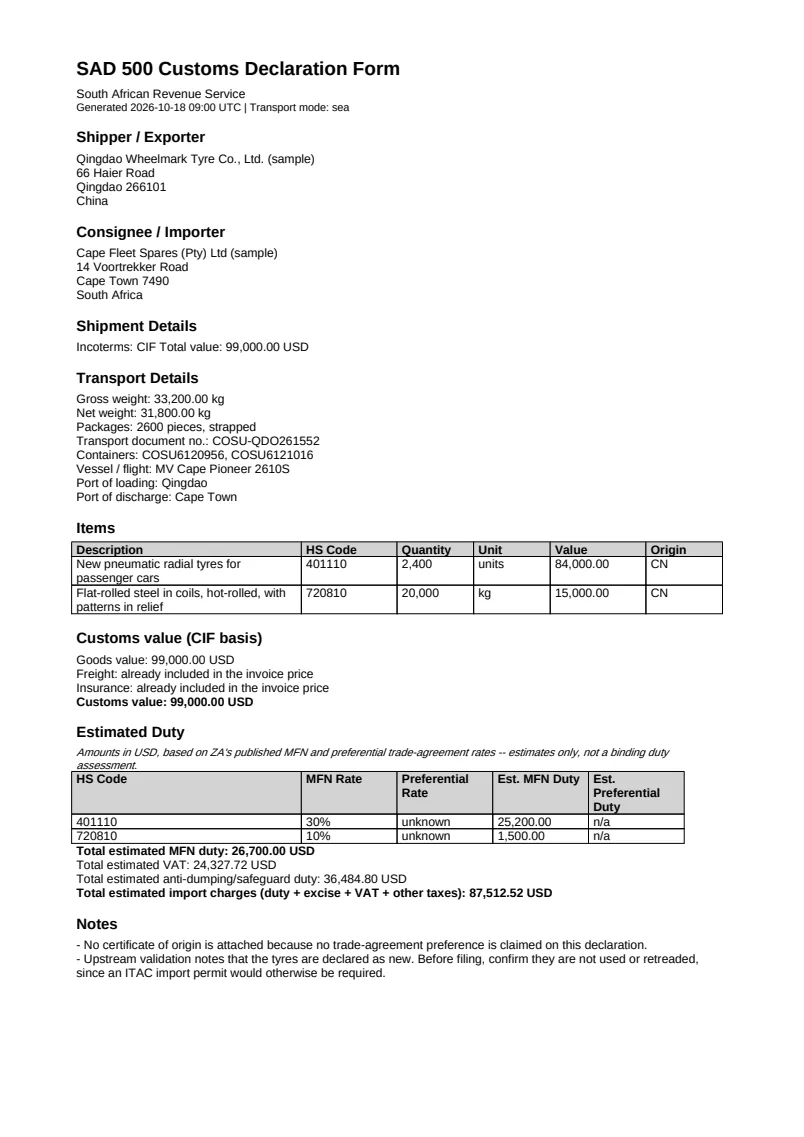
China to South Africa · English
Car tyres and flat steel
Trade remedies: $36,485
Coverage across 193 countries -- at every depth we've actually built
Declaration requirements -- form name, issuing authority, required languages, supporting documents -- are researched and cited for all 193 UN member countries. Duty rate data goes deeper for some than others; the numbers below show exactly how far.
See the full coverage breakdown193
destination countries with declaration requirements researched and cited
161
with live MFN duty rate data
109
with a preferential rate, across 29 agreements
161
markets live in the free duty calculator today
29
Trade agreements with real preferential rate data
75
Declaration languages, rendered in the destination's own script
Customs declaration forms by country
Find the declaration form, required documents and restrictions for the markets people look up most. All 193 countries are covered.
- Belize customs declaration form
- El Salvador customs declaration form
- Argentina customs declaration form
- Kenya customs declaration form
- Tanzania customs declaration form
- Cameroon customs declaration form
- Seychelles customs declaration form
- Madagascar customs declaration form
- Timor-Leste customs declaration form
- Trinidad & Tobago customs declaration form
Fits how you already work
Invoices come in through a shipment, the Documents page, the API, or a connected mailbox; approved declarations flow back out to QuickBooks Online, NetSuite, or your own webhook endpoint -- no manual re-entry.
- QuickBooks Online
- NetSuite
- Webhook
- Mailbox
Built on official customs data, credited in full
Nomenclatures, tariffs and agreements come from the WCO, UN Comtrade, Eurostat, the USITC, HMRC and the customs authorities of China, India, the UAE, Brazil, Türkiye, Egypt and more. We credit every source and say what we changed.
- WCO
- UN Comtrade
- Eurostat
- USITC
- UK HMRC / DBT
- State Council Tariff Commission (CN)
- CBIC (India)
- Dubai Customs
- Siscomex (Brazil)
- Resmî Gazete (Türkiye)
- Egyptian Customs
- ECOWAS
- EAC
- World Bank WITS
- UNCTAD TRAINS
- AfCFTA Secretariat
- Eurasian Economic Commission
- CEPII
Contains public sector information licensed under the Open Government Licence v3.0.
Rates By Exchange Rate API.
Customs Declare is not affiliated with, endorsed by or sponsored by any publisher named here; names are used only to credit their data. Where we translated, extracted or reformatted a text, it is not the official version. Use the publisher's own text for legal purposes.